
As someone based in Europe, I’m used to the convenience of free roaming across the EU. It’s something I’ve taken for granted, being able to use my usual mobile plan in Spain, France, or Italy without even thinking about it.
But outside of the EU? That’s a different story. International roaming costs can pile up fast, and for short trips, a weekend away or a one- to two-week getaway, it’s never really worth activating one of those pricey global data add-ons. Typically, I just rely on Wi-Fi: at hotels, cafes, and anywhere else I can get a signal.
When I planned a recent trip to Egypt, though, I wasn’t sure how easy it would be to find reliable public Wi-Fi, and I knew I didn’t want to waste time searching for it every time I needed to order an Uber or check opening hours for a museum. I also didn’t want to pay extra card fees just because I couldn’t book something online on the go.
That’s when I decided to try Airalo, the travel eSIM service. I figured it could be a good alternative to hunting for a local SIM card or paying for a roaming package I barely needed.
In this article, I’ll walk you through:
- How I picked my Airalo Egypt plan and how much it cost (applicable to all locations)
- The full step-by-step buying and setup process (with screenshots)
- What the coverage was like on the ground
- And my honest take: would I use Airalo again?
Whether you’re heading to Egypt or just curious about how travel eSIMs actually work in practice, this guide is based entirely on my real experience and might help you skip some of the usual travel connectivity headaches.
👉 Use my Referral Code “TALESF5100” on the Airalo website and get €3 off your first purchase!
What Is an eSIM Card?
An eSIM (short for embedded SIM) is a digital version of a SIM card; the small chip that connects your phone to a mobile network. But unlike traditional SIM cards, you don’t need to insert anything into your phone. No plastic. No trays. No tiny tools you always lose.
With an eSIM, everything happens digitally.
You just download the SIM profile onto your phone (kind of like installing an app), and once it’s active, you’re connected to the local network in whatever country or region you’re visiting.
So what’s the point?
- No more buying and swapping physical SIMs when you land
- No need to visit a store or kiosk. Everything can be done online
- You can still keep your regular SIM in your phone and just turn it off while abroad
- Perfect for short trips, stopovers, or multi-country adventures
If your phone supports eSIMs and it’s unlocked, you can have multiple mobile plans saved and switch between them easily, depending on where you are.
Tip: Most newer phones (iPhones from XS and up, recent Samsung and Google Pixel models) already support eSIMs. If you’re unsure, you can check Airalo’s compatibility list before making a purchase.

Key Benefits of Using Airalo eSIM for Travellers
If you’re someone who loves to travel (or travels frequently for work), Airalo really simplifies staying connected, without the stress or sky-high roaming fees. Here’s why it works so well:
Stay Online Almost Anywhere
Airalo offers eSIMs for over 200 countries and regions, so no matter where you’re headed, you can get online without relying on spotty hotel Wi-Fi or racking up international roaming charges.
No More SIM Card Hassles
You don’t need to waste time tracking down a local SIM card after landing. With Airalo, you can install your eSIM before your trip (continue reading to learn how).
Regional Plans Make Multi-Country Trips Easy
One of my favourite features: Airalo doesn’t lock you into just one country. If you’re travelling across multiple countries, you can pick a regional plan, like their Eurolink option, which covers 42 countries across Europe.
They also have plans for Africa, Asia, Latin America, North America, the Middle East, Oceania and the Caribbean. I wish I had purchased one when I was backpacking in South America a few years ago!
Reliable Support, Around the Clock
Their support team is available 24/7, 365 days a year, and they’re surprisingly responsive. Whether you prefer chat, email, or messaging via social media, someone’s there to help if you hit a snag.
Choosing your Destination & Plan
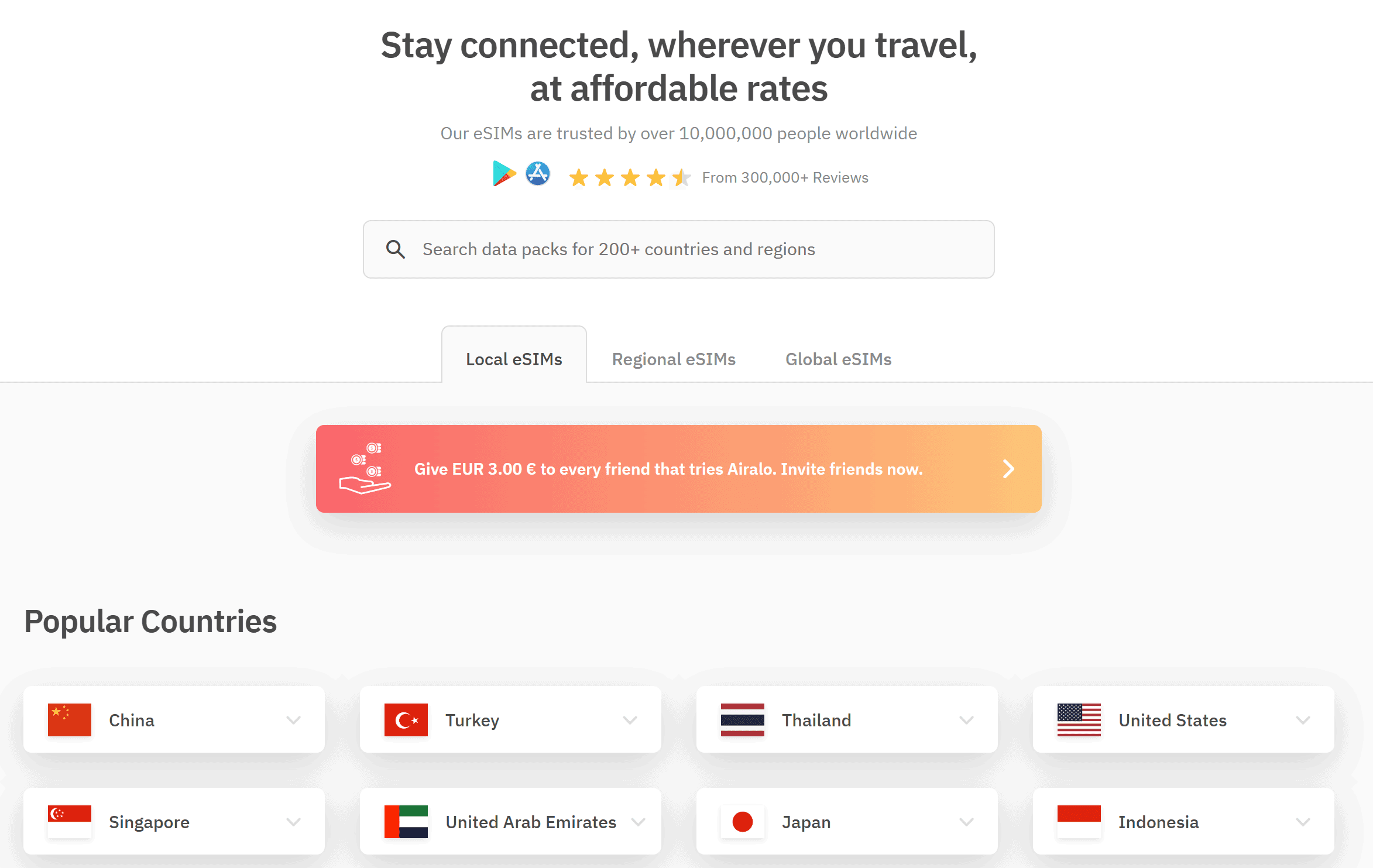
One of the things I liked about using Airalo was how simple the process was. You just open the app (or website), type in the country you’re visiting, and all the available eSIM plans pop up. No need to Google around comparing providers or read the fine print of confusing roaming offers.
When I searched for Egypt, all the options were through something called Giza Mobile. Here were the options I got:
- 1 GB for 7 days – €7.00
- 2 GB for 15 days – €12.00
- 3 GB for 30 days – €17.00
- … all the way up to 10 GB or unlimited for heavier users
Since I was only going for about a week and knew I’d still use Wi-Fi when I could, the 2GB plan for €12.00 felt like the sweet spot. It gave me enough data to use Google Maps, order rides, translate random Arabic signs, and buy the occasional online museum ticket.
It was particularly handy to order an Uber whenever I needed one and buy entry tickets on the official website. I did this while visiting the Pyramids of Giza on my own, to purchase an add-on ticket after I had already passed the ticket office. Very handy!
💡 Tip: If you’re not sure how much data you’ll use, check your phone settings to see how much you typically use on a regular week. For me, 2GB was actually more than enough since I wasn’t going to be streaming or uploading big files.


Step-by-Step – How to Buy & Activate the Airalo eSIM for travel
If you’ve never used an eSIM before, don’t worry, it is a very simple process!
Step 1: Find Your Destination & Choose a Plan
Start on the Airalo website (they also have an app) and enter your destination or select one of the countries listed on the main page. The local plans will then appear.
Once you’ve selected the plan that makes the most sense for your trip, click ‘Buy Now’. You will get a pop-up with Additional information & supported countries.
Make sure to double-check all the Network information, plan type, and validity policy before continuing. If everything is okay for you, click on the “Buy” button or choose another package.
Step 2: Checkout & Payment
Once on the checkout page, you can choose your payment method. They accept Credit & debit cards (Visa, Mastercard, Amex, CUB and JCB) as well as PayPal.
Airalo even gives you AirMoney (yep, their own little cashback system). I got €0.60 back just from that one purchase, which you can use for your next purchase. If you already have AirMoney, you can use it upon purchase (the minimum amount you can use is €1). You may also enter any discount code or referral credit.
👉 Use my Referral Code “TALESF5100” on the Airalo website and get €3 off your first purchase!

Heads up: Before you click Complete Order, you need to confirm that your phone supports eSIMs and that its network is unlocked. If it’s not, the eSIM won’t work. A pop-up will appear when you tick the mandatory field, with a list of all the compatible Devices. Make sure yours is there.


Step 3: Order Confirmation
Once the payment goes through, you’ll receive a confirmation screen and an email in your inbox immediately. From here, you can start installing your eSIM card; even if you are not in the country yet.

Step 4: Install the eSIM on Your Phone
This part depends a bit on your device, but the process is clearly explained within the app. Since I use Samsung, I got a tailored step-by-step with a QR code to scan.
Upon scanning with my phone camera, the Installation started on my phone, and it walked me through the configuration. If your QR code doesn’t work for any reason, Airalo provides manual, step-by-step details on the same page.
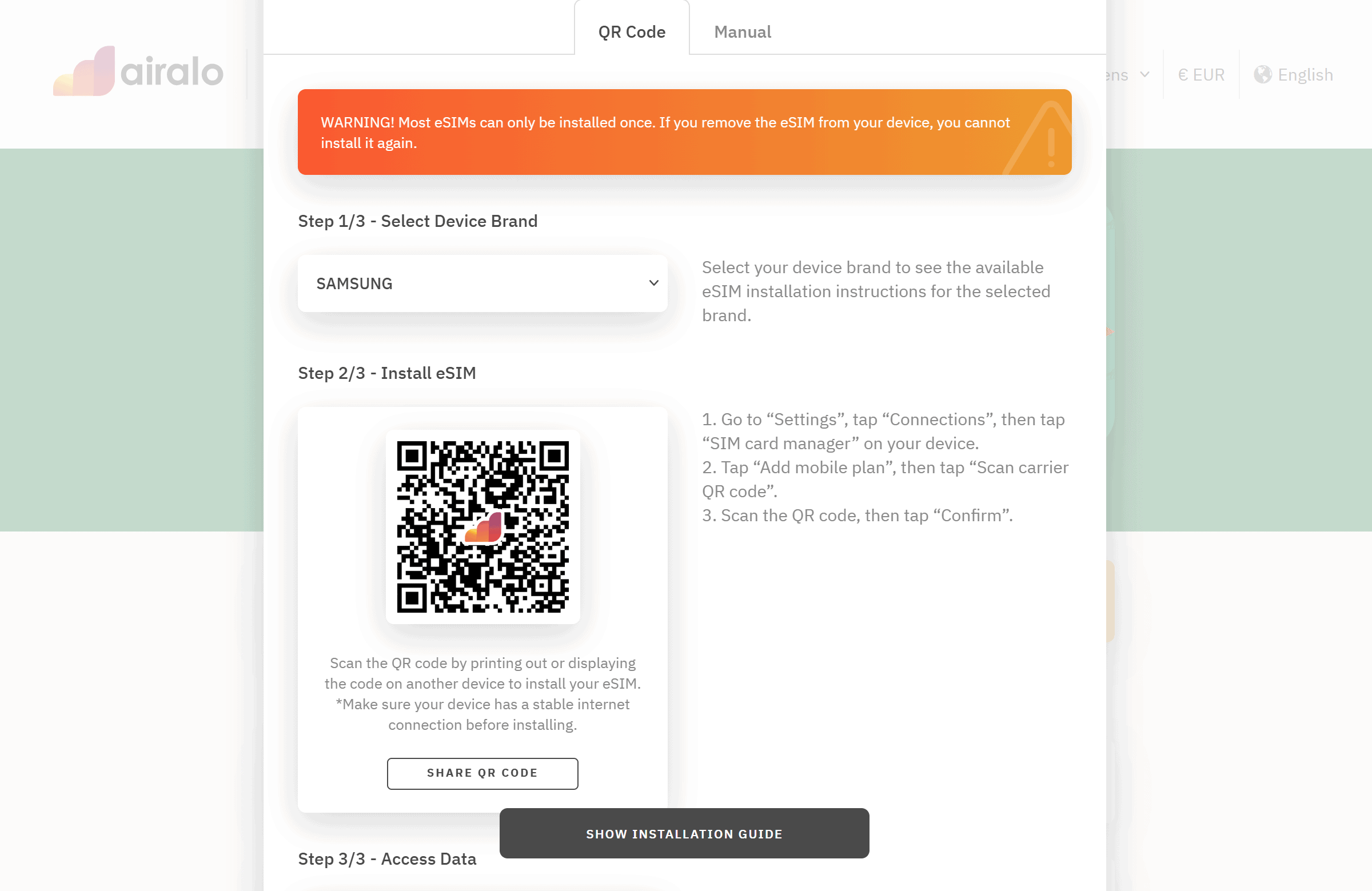
Important: make sure you’re on a stable Wi-Fi connection during this. If the connection drops or you interrupt the process, the eSIM might not install properly. You will get a pop-up with this important information. Make sure to read it before continuing.


Step 5: Configure Your Network Settings
Once installed, you’ll need to set up the APN (Access Point Name) so the data actually works. Airalo will automatically detect your network, APN, and Data Roaming settings. You will have to follow the exact steps displayed on the site. It is very simple as long as you follow the same steps tailored to your device.
It takes about two minutes.

Bonus Tip: Switch your SIM before taking off
Once your eSIM is installed and set up, there’s one more step I highly recommend, and this is something I figured out the practical way.
On most phones, you’ll find a section in Settings > Connections > SIM Manager. That’s where you can manage your SIM cards; both physical and digital. You can switch them on or off depending on which one you want to use for data, calls, or texts.
You can’t activate a SIM while your phone is in flight mode. Which means if you wait until landing at your destination to switch on your eSIM, you’ll have to turn off flight mode to then turn OFF & ON your personal SIM and the new sIM. It’s a risk that your original SIM might connect to the local network, and you could incur a day of roaming data just for a couple of seconds of connection.
To avoid that risk, before boarding the plane, go to your SIM Manager, switch OFF your regular, personal SIM and switch ON your Airalo eSIM you just installed. Then turn on your flight mode.
Don’t worry, the validity period only starts once your eSIM connects to a mobile network in the country or region it covers. So even if you install it ahead of time while you’re still at home, it won’t activate until you arrive and connect locally.
No stress and no surprises!
Pros & Cons of eSIM Cards for Travel
What I Like
✅ Coverage in 200+ countries
✅ Easy setup, even for first-timers
✅ Regional & global plans for multi-country trips
✅ Works well with local carriers
What’s Missing (I didn’t mind)
❌ Most plans are data-only; no phone calls or texts
❌ Some devices (older models or carrier-locked phones) don’t support eSIMs
Common Questions About eSIMs for Travel
Do eSIMs work in the U.S.?
Yes; Airalo offers several eSIM plans for the U.S. From €4.5 for 7 days (1Gb) to €38.5 for 30 days and 20 Gb. These plans cover all 50 states of the United States, and Puerto Rico.
Can I use a personal hotspot with an eSIM?
In most cases, yes. I used my Egypt eSIM to tether my laptop briefly, and it worked just like a regular SIM. That said, some providers may restrict hotspot use, especially on cheaper plans or in certain countries, so it’s worth checking the plan details before buying if that’s something you rely on.
Are eSIMs safe? Any privacy concerns?
In terms of security, eSIMs are actually more secure than physical SIM cards. There’s nothing to steal or clone, and they can’t just fall out of your phone. As for privacy, Airalo partners with local telecoms, so your data is going through the same networks as a local SIM would. I personally haven’t had any issues or shady behaviour with mine, and the app is very clear on what info they store.
If I buy an eSIM for one European country, does it work in others?
No; country-specific eSIMs only work in that country. For example, if you buy an eSIM for France, it won’t connect in Italy or Spain.
BUT, Airalo offers a “Eurolink” regional eSIM, which covers 42 European countries. It’s perfect if you’re doing a multi-country trip across the continent and don’t want to switch eSIMs at every border. They also have similar regional plans for:
- North America
- Africa
- The Caribbean
- The Middle East
- And others
If your itinerary spans multiple countries, a regional plan is definitely worth considering.
What if I travel frequently to different places?
If you’re often hopping across continents throughout the year, Airalo’s Global eSIM could be the most convenient option. It works in 138 countries and is valid for up to 365 days. For example:
- 20GB valid for 365 days = €63
It’s more expensive upfront, but it saves you from having to buy a new SIM for every destination. Ideal if you travel several times a year.
Final Verdict: Is Airalo Worth It?
Yes. For me, Airalo delivered exactly what I needed.
The 2GB Egypt plan for €12 was totally worth it for a one-week trip. I didn’t need a ton of data, just enough to use Google Maps, grab Ubers, and book museum tickets online, and it worked everywhere I went. Even better: it was easy to install, took just a few minutes, and I didn’t have to chase down a SIM card kiosk at the airport or worry about switching out physical SIMs.
I also appreciated the little things:
- I got email updates when I’d used a chunk of data
- A reminder that my plan was about to expire
- And zero issues with connection or performance while I was in Egypt
Would I use it again? Absolutely. Definitely recommend if you only need internet (nowadays, we all use WhatsApp to make calls anyway!
✈️ Ready to Travel?
Airalo was just one of the tools that made my trip to Egypt easier. Still, if you want to see the full list of travel resources I personally use (for booking flights, finding accommodation, organising itineraries, and more), check out this page: 👉 My Favourite Travel Tools & Resources
And if you’re planning a trip to Cairo specifically, I’ve got you covered there too:
- Things to Do in Cairo
- How to Visit the Pyramids of Giza on Your Own (No Tour Needed)
- Top landmarks to visit in Egypt
Hope this guide helped you feel more confident about using an eSIM for your next trip.

ARE YOU ON PINTEREST?
What about saving this post to your Pinterest board?
Click on the photo to save this blog post for later. We are also on the platform, and we love pinning great travel tips. Follow Tales From The Lens’ boards to see our latest pins.
Don’t be shy, come say hi!
Please note │ This blog post may also include affiliate links to hostels or products we recommend, which means if you buy something following a link on this page, we’ll get a small commission. This will be of no extra cost to you but will help us continue running this blog. Thank you for your support.

About the Author
Jen is the Funder, Author & Photographer behind Talesfromthelens.comJen has lived for the past 15 years across Oceania and Ireland while also travelling in Latin America, North America, and Europe. She has visited more than 65 countries and set foot on every continent in the world! She is a coffee nerd, passionate about photography, wildlife, and outdoor activities.
For more info, check out the About page.
Hello, can you add more information about how will existing apps on your phone work, Like whatsapp? Ring? Rover? Ect TY!
Hey Kat, Whatsapp worked perfectly find with the Airalo. Same for all my apps on my phone, had no issue. I do not have Ring or Rover but I don’t see any reasons why they wouldn’t work. Airalo works just like a normal SIM card except it is only for internet (no phone network). Hope this helps?